

The core idea
AltamIQ is a Partner Relationship Management (PRM) app, and everything in it revolves around one thing: the partner. A partner is a company you work with, and every other record you track (the deals you register, the certifications your teams earn, the compliance items you monitor, the marketing assets you share, and the strategy you plan together) connects back to that one partner. Once you learn to think “partner first,” the whole app clicks into place.The partner is the hub
Think of the partner as the center of a wheel. Each spoke is a different kind of record, and each one is always attached to a specific partner. When you open a partner, you see all of their spokes gathered in one place.How information gets in
Partners can arrive in AltamIQ two ways:Created manually
A team member adds a partner directly in AltamIQ and fills in the details: name, type, contacts, and headquarters.
Synced from HubSpot
When a company in HubSpot is tagged as a partner, it flows into AltamIQ automatically. This is a one-way sync (HubSpot to AltamIQ), so your CRM stays the source of truth and AltamIQ keeps the matching partner up to date.
Fresh partners start as the Pending type until someone classifies them, and their lifecycle status begins at an early stage such as Submitted. Both are yours to update as the relationship grows.
A typical journey
Here is how a partner usually moves through AltamIQ from first contact onward.1
A partner is added
Someone creates the partner by hand, or it syncs in from HubSpot. You classify its type (Pending, Catalyst, Alliance, Keystone, Sentinel, or Vanguard) and set its tier.
2
You register deals
As opportunities come up, you register deals against the partner and track them through the pipeline.
3
You track certifications and compliance
You record which certifications the partner’s people have earned and monitor the compliance items they need to stay in good standing.
4
You share assets and plan strategy
You give the partner access to marketing assets and capture the strategy for growing the relationship.
5
You watch the numbers
Analytics roll everything up so you can see how partners, deals, and certifications are trending across your whole program.
Everything lives in the partner profile
Open any partner and you land on their profile: a single page with a row of tabs, one per kind of record. You never have to hunt across the app to understand a partner; it is all right here.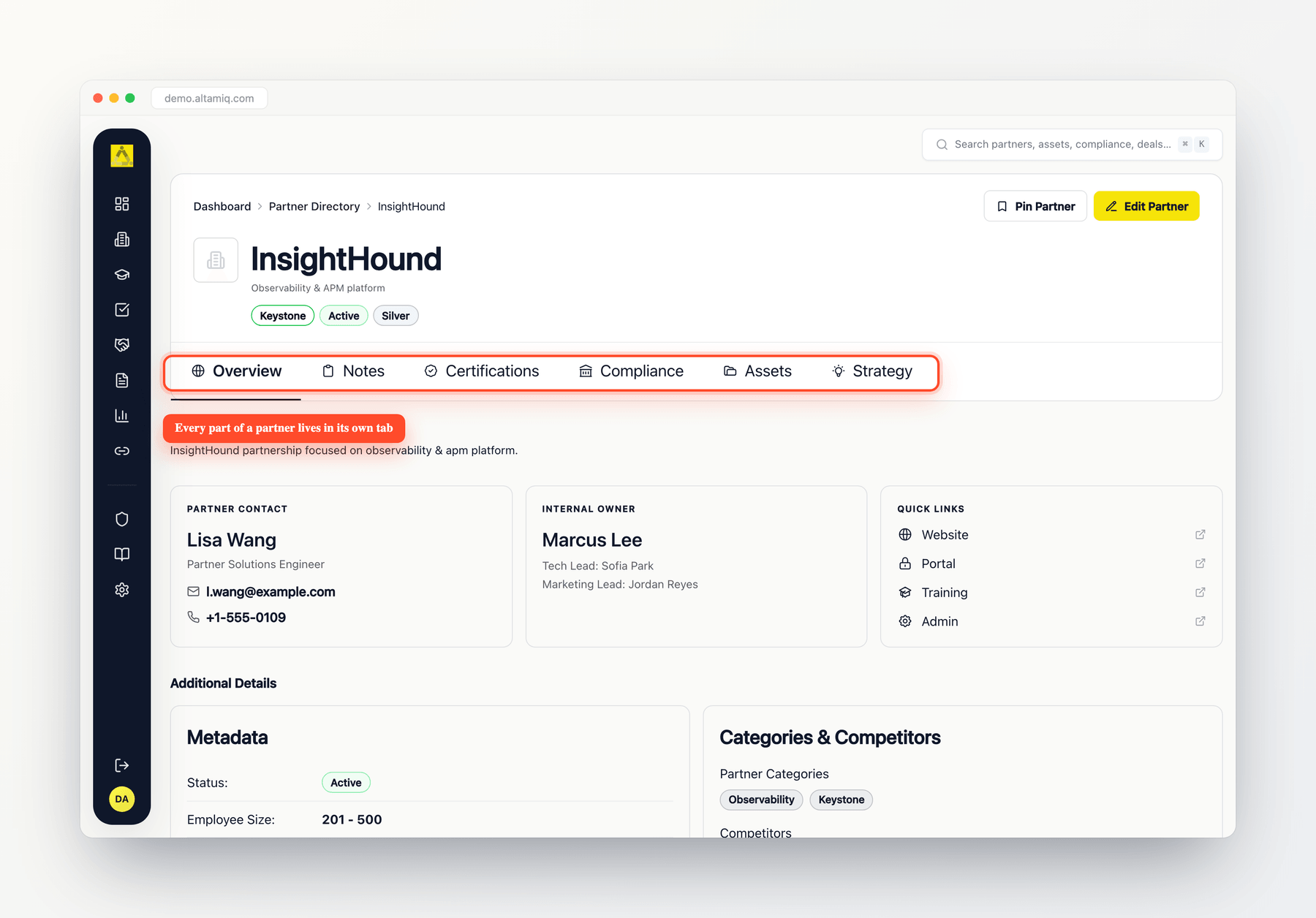
Everything about a partner lives in one profile
What you can change depends on your role. Admins and Managers can add and edit records, while Viewers can look but not make changes.
Key terms
Partner
Partner
A company you have a relationship with. It is the hub of the app: every other record connects back to a partner.
Partner Type
Partner Type
A classification for the partner’s role in your program: Pending (not yet classified), Catalyst, Alliance, Keystone, Sentinel, or Vanguard. Your team can also define custom types.
Tier
Tier
A ranking or level you assign to a partner to reflect its standing or investment in the program.
Deal
Deal
A sales opportunity you register against a partner and follow through the pipeline.
Certification
Certification
A record that a partner’s people have completed a required training or accreditation.
Compliance
Compliance
A requirement a partner must meet to stay in good standing, tracked so nothing lapses.
Asset
Asset
A marketing or enablement file you make available to a partner.
Affiliate
Affiliate
An affiliate program or referral arrangement tracked alongside your partners.